Posts By Andre Fisher


Business Resources for Small Business
Business Resources for Small Business
Online Hints, Tips and Helps for Small Business wanting to BUST OUT on the internet. Learn how to Market your business on a Budget and maximize internet marketing with search engines and other techniques.

5 Best Anti-Malware Software Choices for Small Businesses

Did you know 43 percent of cyber attacks target small businesses? As the hackers and cybercriminals use increasingly sophisticated ways to attack, it is vital these small businesses have cyber security defense plans in place. A small business’s online cyber security efforts should include utilizing anti-malware software to help protect their data from malware attacks. Installing anti-malware software protects business data and systems against infections caused by different types of malware.
Best Malware Software for Small Business
Fortunately, installing effective anti-malware software doesn’t need to be expensive, so it can be used to the advantage of small businesses lacking the large budgets to spend on cyber protection. Take a look at some of the best anti-malware software choices for small businesses.
Kaspersky Small Office Security
In 2015, Kaspersky Lab channeled its energies into offering online security solutions for small businesses with fewer than 25 employees. The system is designed for small businesses running 5 to 45 computers, some servers and mobile devices. The easy-to-use software is managed from one cloud-based console.
Kaspersky Small Office Security protects businesses from online attacks, ransomware and data loss. The system is supported on Windows desktops and laptops, Mac desktops and laptops, Windows-based file servers and Android smartphones and tablets.
Kaspersky Small Office Security costs $112.49 for a year for five users.
AVG File Server Business Edition
AVG provides a reliable and affordable anti-malware software solution for small businesses. As well as offering antivirus protections, AVG monitors a business’s downloads, deletes files securely, scans social media and website links, password protects and encrypts files, provides a top-quality firewall and stops spam.
Businesses can manage online security on the remove by using AVG’s remote admin tools. The AVG File Server Business Edition’s network virus scanner helps keep business data safe from malware and hackers. The anti-malware software for small businesses starts at around $30, excluding VAT.
Webroot
Webroot has long recognized the threats malicious attacks pose to small businesses. Webroot’s cloud-based endpoint protection keeps users safe at all stages of a cyberattack. Webroot’s anti-malware software is easy to install and manage, doesn’t conflict with other software, and is fast, lightweight and powerfully effective.
Webroot enables small businesses to try their security software with a free trial before they buy. Webroot’s SecureAnywhere Antivirus software for PCs and Macs costs $29.99 per device for a year.
BitDefender Antivirus Free Edition
Hailed as the “strong and silent type”, the BitDefender Antivirus Free Edition is powerful anti-malware software that’s easy to install and silently gets on with the job of keeping your devices safe. The effective anti-malware software is equipped with B-Have, which identifies any apps you may have installed behaving badly. The BitDefender Free Edition also scans links to identify cons and detects threats never been encountered before.
This award-winning protection against both existing and new e-threats can be downloaded for free.
Avast
Since the 1990s, Avast has been helping businesses stay protected from malware and cyber crime, by offering lightweight and intuitive protection. Avast blocks around 4,000 threats every day and protects 700,000 businesses around the world. The software offers a number of antivirus products for businesses, which cater for different sizes and budgets.
The least expensive option is Avast Business Antivirus, which includes antivirus, Behaviour Shield, Cybercapture, SmartScan, WiFi Inspector, Firewall, Web Shield, Email Shield, Anti-Spam and Sandbox. The Avast Business Antivirus software costs $39.99 a year for each device.
Using any of the above malware software would be an affordable and easy way to protect your small business against the growing threat of malware and the destruction cyber attacks can have on small businesses.
Photo via Shutterstock
This article, “5 Best Anti-Malware Software Choices for Small Businesses” was first published on Small Business Trends

Payoff Debt Vs. Invest In Your Business: This Article will Help You Decide What’s Best

Debt can be a huge liability for most people but for business owners, it can be even more damaging.
Entrepreneurs tend to have a fluctuating income and must meet the challenge of budgeting for fixed expenses with it. Add on the fact that it’s wise to invest in your business to keep it stable and growing.
Pay Off Your Debt or Invest in Your Small Business?
So which one should you choose?
It Can Depend on What Type of Debt You Have
If you have personal debt like student loans, a car loan, or credit card debt, you can try to pay it off before you fully launch your business or at least pay it down so you have manageable monthly payments.
When I quit my 9-5, I only had student loan debt and it was a small monthly amount. I still wanted to pay it off quickly, but I didn’t have to and could still afford to invest some money back into my business.
If your debt is high-interest and unmanageable, you may not be able to afford to invest much into your business anyway and should focus on paying it off ASAP.
If you take out debt to start your business, consider that enough of an investment and commit to using some of your profit to pay that debt off.
Is Your Business Your Sole Source Of Income?
If so, you must consider investing in your business to keep the income flowing in. You can spend money on contractors, software, marketing and other systems without going overboard.
When you’re investing in your business, you always want to consider the ROI and constantly assess what’s working and what isn’t.
Set a budget to determine how much of your profit you want to put directly back into the business and leave some income to at least make minimum payments on your debt.
The key purpose should be to grow your business’ reach and revenue so you can eventually pay off debt and continue to put money back in.
Start With a Solid Savings Stash
Before you decide what’s best for you, you want to build up your savings as a backup. If you choose to focus more on debt payoff and your business doesn’t grow as rapidly, you want to have money set aside to help you fund the lower income months.
If you choose to invest in your business and minimize debt payments, you don’t want your debt to grow and become a huge liability for you in the future. Either way, having some cash reserves set aside for expected and unexpected situations can help you prevail no matter what you choose.
Budget For Both
A smart solution would be to budget for both so you don’t neglect any important areas of your business or personal finances.
See if you can lower some of your living expenses and develop new business revenue streams to meet both goals. Maybe you can pick up new clients, develop a new product or establish a profitable partnership to earn more so you can afford to pay a little extra on your debt and still put money back into your business.
This mindset allowed me to take action to pay off the rest of my $11,000 student loan balance and still invest $10,000 into my business last year.
Summary
Deciding whether to pay off debt or invest in your business can be a difficult decision, but you can do both if you follow the right steps. You don’t want your business or your debt to explode so make sure you have a solid savings plan and budget in place, while carefully focusing on ROI until your debt is paid off in full.
Republished by permission. Original here.
Image via Due.com
This article, “Payoff Debt Vs. Invest In Your Business: This Article will Help You Decide What’s Best” was first published on Small Business Trends


Election 2016 Resources for Small Business
Election 2016 Resources for Small Business
President & CEO Karen Kerrigan shares key resources developed by SBE Council to help entrepreneurs and small business owners know where the presidential candidates stand on issues, and how members of Congress voted on various bills that impact small business competitiveness and the economy. Visit the SBE Council website: www.sbecouncil.org.

Checklist: 10 Places to Put Your Small Business Logo

Once you create the logo to best represent your company, you have to start using it strategically so it can have the most impact. LogoMaker has published an infographic with a checklist of 10 spots where you should use your logo.
When your logo is out in public, you are telling the world you are ready for business. Soon, it starts becoming a brand people recognize. Making it stand out among all of the established logos and advertising is not easy. But it’s very doable, with the right approach.
For small businesses with limited budgets, the task becomes even more difficult. So placing your logo in places where your potential customers will find it is key. With enough exposure, they will become familiar with it, and anytime they see it, will think of your business.
Where to Put Your Business Logo
Here are five of the 10 spots LogoMaker recommends. You can look at the remaining five places in the infographic below.
Social Media Profiles
If you are active on social media, make sure your logo is part of the content you post. Format the logo according to the specification of each channel so your followers can see it, and so the entire image is in full view.
Website and Blogs
LogoMaker says you should showcase your logo on your website or blog at the top of the page, preferably displayed horizontally. The logo should also be next to other items associated with your brand, such as tagline or bio.
While on the subject of websites, remember to create a favicon so it can be in all of the pages of your site. A favicon is basically a miniaturized version of your logo which can be linked to your home page for use by feed aggregators.
Products and Packages
With eCommerce now part of almost all businesses, you are very likely to be shipping packages to your customers. Placing your logo on the product as well as the shipping package lets everyone see where it comes from.
Invoices and Forms
When you send out invoices or forms to be filled out, make sure they have your logo on them. Generic invoices and forms might be cheaper, but they don’t communicate anything about your company.
Business Vehicle
Even if you only have one vehicle for your business and it is your personal car, use it to advertise your brand. This type of passive marketing gets a lot of eyes on it every time you get in your vehicle and drive. As LogoMaker says, your vehicle becomes a moving billboard for your brand.

Images: LogoMaker
This article, “Checklist: 10 Places to Put Your Small Business Logo” was first published on Small Business Trends

Uber Health Offers Rides to Doctor Appointments Benefiting Patients and Small Practices

Uber has announced the availability of Uber Health after beta testing the platform with more than 100 healthcare organizations across the US.
The new service is going to provide transportation for the patients of healthcare providers even if they don’t have a smartphone or the Uber app. A centralized dashboard will allow organizations in the healthcare industry to provide reliable transportation with Health Insurance Portability and Accountability Act (HIPAA) compliance.
For small medical practices looking to serve patients without transportation, Uber Health is a viable solution. Elderly, disabled patients who have just had a procedure or those without a vehicle, can use the service to keep their appointments with their healthcare provider.
Patient no-shows are a big problem in the US. The Community Transportation Association and SCI Solutions claim 3.6 million Americans miss their doctor appointments because of transportation-related issues, and nationwide 30 percent of scheduled appointments are no-shows.
This problem especially affects a segment of the population with the greatest need. On the official Uber Newsroom blog, Chris Weber, General Manage of Uber Health writes, “…while transportation barriers are common across the general population, these barriers are greatest for vulnerable populations, including patients with the highest burden of chronic disease.”
Uber Health
The dashboard on Uber Health lets staff in healthcare facilities order rides for patients on the spot or make future arrangements. Rides can be scheduled for the patient within hours or up to 30 days in advance. If a patient needs multiple rides, the staff can make the arrangement in the dashboard and manage the activities.

As stated earlier, patients don’t need to own a smartphone or have the Uber app to take advantage of the service. Text messaging can be used to coordinate rides, and the company said it is going to be introducing a feature to make trip details available on mobile or landline phones.
The system has a management solution to keep track of the billing with reporting on what is being spent on rides along with scheduling and appointment information. And because Uber is providing services in the healthcare segment, there are regulations which must be followed. HIPAA compliance was established in collaboration with Clearwater Compliance to ensure comprehensive risk and compliance assessments protocols were followed.
Uber Health is now available with the dashboard along with its API for integration into existing healthcare products.
Images: Uber
This article, “Uber Health Offers Rides to Doctor Appointments Benefiting Patients and Small Practices” was first published on Small Business Trends

Small Businesses Using YouTube Live Updates will Soon See New Features

YouTube has announced three updates to its live streaming service giving live broadcasters, including small business marketers, more options to engage with their audiences.
The new features give content creators and their audiences more options, whether an event is live or after the fact. The goal, according to YouTube, is to increase the level of interaction between content creators and their audiences allowing them to communicate in real time.
YouTube is used by businesses of all sizes to showcase the products and services they provide. For content creators, who are classified as small businesses, the platform is used to monetize the content they generate. And all these content creators rely on engaging with their audiences to maximize the return on their investments.
The new features YouTube has announced will improve the experience viewers have when watching live streams too.
YouTube Live Updates Captions and Chat
The first update uses an automatic speech recognition technology to provide automatic English captions to live streams. If your small business can’t afford a professional caption service, this is a great feature to make your streams more accessible, especially for people who are hearing impaired.
The captions are also important because of the amount of silent video that’s watched, especially on social media. The system is not 100 percent accurate but is an option.
The second update makes it possible for your audience to replay the chats you have on live streams. This lets them follow the conversations people were having during the live stream even after it is over. The chat stream appears just as it did during the event alongside the video.
The third update gives creators geo-tagging capabilities when they are using their mobile device to stream live and upload videos. Users can then see exactly where the event is taking place if they decide they want to visit or know the location. A location filter can also be used on the search results page to find other videos from a specific place.
Enabling Live Streaming
If you want to stream a live event and you still haven’t used this feature on YouTube, you first have to enable your channel.
You start by confirming your channel is verified and you have no live stream restrictions in the last 90 days. Once you do this, you can enable live streaming by going to the Creator Studio tools and clicking the Live Streaming tab. You are now set to start creating live video. However, it can take up to 24 hours for the feature’s setup to install. After the first event, your streams will go live instantly.
Image: YouTube
This article, “Small Businesses Using YouTube Live Updates will Soon See New Features” was first published on Small Business Trends

The New Sony Xperia XZ2 Has Tools for Small Business Content Marketers

Sony (NYSE: SNE) announced the Xperia XZ2 at Mobile World Congress 2018, where the prevailing theme amongst smartphone manufacturers this year has been cameras and entertainment.
Hideyuki Furumi, Executive Vice President of Global Sales and Marketing for Sony Mobile Communications, explained in a press release, “If entertainment is your priority, then our new Xperia XZ2 and XZ2 Compact are your smartphones. We have pushed Sony’s boundaries even further with our new products for movie recording, viewing, and music listening.”
However, for content creators, particularly small business marketers, the XZ2 also has some noteworthy features which may persuade them to consider it as their daily driver, especially if the price is right.
The Xperia, Sony’s flagship phone, comes in two different versions. The XZ2 and the XZ2 Compact have been designed with quality cameras, display and audio technology content creators involved in small business marketers can take advantage of.
For small businesses operating in a creative field, the XZ2 is a smartphone packed with powerful features for creating and consuming content.
Sony Xperia XZ2 Specs
The specs both phones share include: a Qualcomm Snapdragon 845 processor, 4GB RAM, 64GB storage expandable up to 400GB with MicroSD card, 18:9 Full HD+ (1080×2160) HDR display, TRILUMINOS Display for mobile, 19MP rear camera and 5MP front camera, fingerprint scanner on the back, and Android 8.0 Oreo.
The XZ2 has a 5.7-inch display, Dynamic Vibration system, QI Wireless charging, 3180mAh battery, and is covered in a 3D Gorilla Glass surface.
The compact version has a 5-inch display, polycarbonate finish and a 2870mAh battery.
The standout features of both phones are fast connection speeds (up to 1.2Gbps) with second-generation Gigabit LTE, 4K HDR Movie recording, 960 fps Super slow motion video (FHD/HD), Predictive Capture (motion/smile), 3D Creator, Movie Creator and AR effect.
Price and Availability
The Xperia line is not the first brand customers think of when they are in the market for a smartphone. But if Sony prices this phone right — meaning much lower than the $1,000 price tag of other flagship phones — it has a great chance of getting more recognition.
Sony hasn’t announced how much these phones will cost when they become available globally in March, so a decision on whether small businesses can fit this device in their budget must wait. However, when the XZ1 launched it was $699 and the XZ1 Compact came in at $599. So if the latest Sony phones come in anywhere near this, they will definitely get the attention of many businesses and consumers alike.
Images: Sony
This article, “The New Sony Xperia XZ2 Has Tools for Small Business Content Marketers” was first published on Small Business Trends

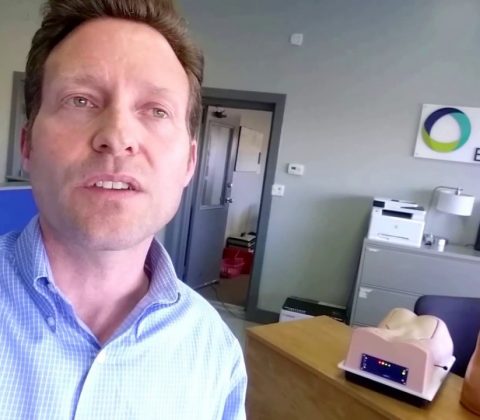
Michigan offers abundant resources for the entrepreneur
Michigan offers abundant resources for the entrepreneur
Thank you GRIN (Grand Rapids Inventors Network) for providing me the opportunity to discuss my personal journey taking the encOR-mis Surgical SmartTrainer technology from an idea to a fully developed working prototype using the incredible resources the State of Michigan has to offer. I would like to thank the following organizations:
– MEDC (Michigan Economic Development Corporation
– SBDC (Small Business Development Center)
– Lake Shore Advantage
– The University of Michigan’s Innovation Services and the Institute for Research on Labor, Employment, and the Economy (IRLEE).
– MICHBIO
All the best!
Jim TenBrink
jtenbrink@encoris.com


Build Your Business: Small Business Resources @ Credit Unions
Build Your Business: Small Business Resources @ Credit Unions
Build Your Business is a service design project that helps credit unions connect with members who have small business ideas or want to grow the business they already own.
With the support of Design for America NYU, OpenIDEO, and Co-op Financial Services, our team presented this video at the 2017 THiNK conference in New York City.
If you are a credit union employee and want to implement BYB in your bank, please contact us at join@buildyourbusiness.us
Visit us at www.buildyourbusiness.us
Recent Comments